Request a demo
KamilEdu for

Tidier schools and learning centres.Calmer parents.

One app for two kinds of institution. Attendance, report cards and tuition for schools. Packages, sessions, mock tests and tutor pay for learning centres. Parents follow both from one account.
Today at SMP KamilEduToday at KamilEdu Learning Center
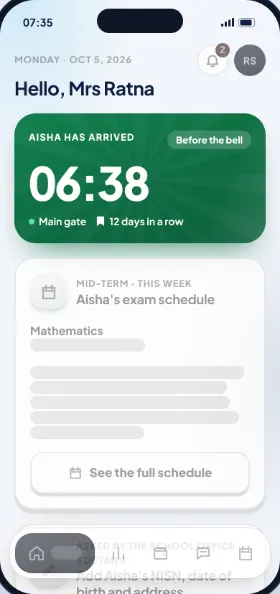
  • Aisha arrives at the gate06:38 · Main gateParents
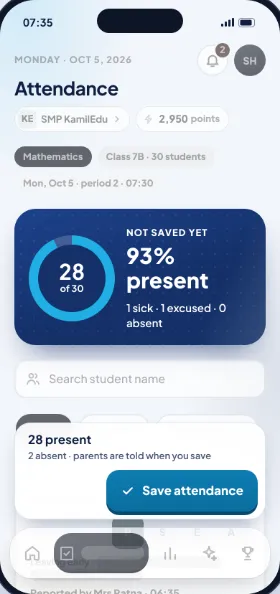
  • Class 7B attendance saved28 present · 2 absentHomeroom teacher
  • Unit test 2, Mathematics: 88Passed · on the parent's phone at onceParents
  • October tuition paid by QRISReceipt sent to the phoneSchool office
  • SNBT Intensive session startsDimas · Depok branchCentre admin
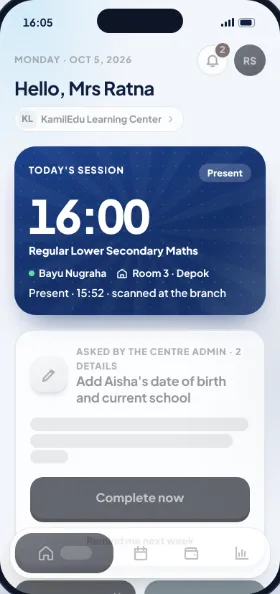
  • Aisha is present in the Mathematics session15:52 · scanned at the branchParents
  • Make-up class on FridayRina covers for DimasParents
  • October tutor pay approvedWith a PIN · all branchesTutors
Scroll to see how it works
At schoolSMP KamilEdu
Parent home screen in the KamilEdu app: Aisha arrived at school at 06:38
At the learning centreKamilEdu Learning Center
Parent home screen at KamilEdu Learning Center: Lower Secondary Maths session at 16:00, Aisha arrived at 15:52
Works with what schools and learning centres already use
  • Excel
  • PDF
  • QRIS
  • Virtual account
  • WhatsApp
  • Kurikulum Merdeka
  • IB
  • SNBT
  • Gate attendance
  • Packages & session credits
  • Digital report cards
  • Mock tests & rankings
  • Online tuition
  • Tutor pay
  • Online admissions
  • Trial classes
  • Payroll
  • Reschedules
  • Online exams (CBT)
  • Parent communication
  1. Teacher · at schoolEvery student starts as present. The teacher only changes who is missing, and their parents are told at once.
  2. Parent · at schoolTuition paid by QRIS or virtual account. The receipt is on the phone at once.
  3. School office · at schoolThe student list from Excel is checked first on the computer. Mistakes are marked before anything is saved.
  4. Tutor and owner · at the learning centreTutors save session attendance. Owners approve pay with a PIN.
In action

Four jobs, one app

Scroll to play

Why KamilEdu

Schools and learning centres don't need more WhatsApp groups and Excel recaps. Both need one place, one number, and everyone knowing who does what.

Made together with principals, teachers, learning centre owners, tutors and parents.

One day, two institutions

School in the morning, learning centre in the afternoon

Aisha goes to SMP KamilEdu and takes classes at KamilEdu Learning Center. Mrs Ratna follows both from one account.

  1. Schools · Gate

    Aisha arrives at the gate

    Her card is scanned and her parents are told right away.

    Present
  2. Schools · Class 7B

    Ms Sarah saves attendance

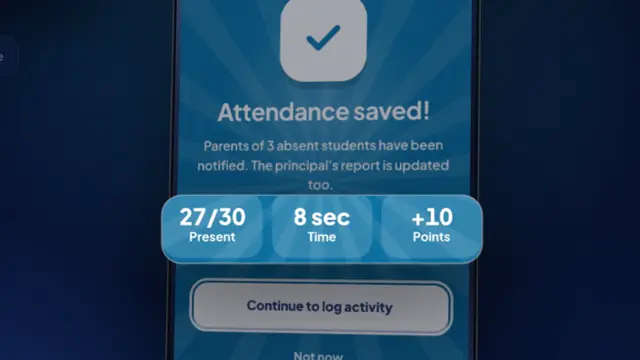
    28 present · 2 absent, seen right away by the homeroom teacher and parents.

    Saved
  3. Schools · Mathematics

    Unit test 2 grades saved

    Mrs Ratna sees Aisha's grade, 88 and passed, on her phone.

    Passed
  4. Schools · Finance

    October tuition paid by QRIS

    Paid at once, receipt sent to the phone.

    Paid
  5. Learning centres · Depok branch

    Dimas opens the SNBT Intensive session

    Students scan a code at the front desk, and their attendance is recorded right away.

    In progress
  6. Learning centres · Depok branch

    Aisha arrives at the learning centre

    Mrs Ratna sees it in the same account, with no other app.

    Present
  7. Learning centres · Centre admin

    18 of 22 students are in

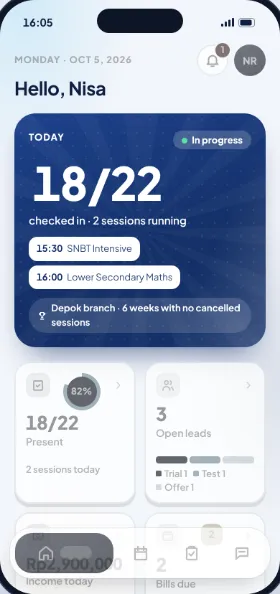
    Mbak Nisa sees every session today and the 3 leads she is following up.

    In progress
  8. Learning centres · Owner

    Session over, tutor pay recorded

    Every session taught goes straight into the tutor pay recap. Mr Rizal approves it once a month.

    Recorded
Before and after

From scattered paper to one app

The same work, without typing it twice and without guessing who hasn't done it yet.

Scroll, or tap a card to compare.
  1. At school · without KamilEdu

    Grades are written in a book, typed into Excel, then copied again into report cards.

    At school · with KamilEdu

    Teachers enter grades once. The recap, reports and report cards match straight away.

  2. At school · without KamilEdu

    Parents ask "has my child arrived?" in the class group.

    At school · with KamilEdu

    Parents are told as soon as their child reaches the gate.

  3. At the learning centre · without KamilEdu

    Remaining session credits and make-up classes are kept in the admin's notebook and in chats.

    At the learning centre · with KamilEdu

    Each attended session uses one credit, and parents can see what's left.

  4. At the learning centre · without KamilEdu

    Tutor pay is worked out by hand from attendance sheets at the end of the month.

    At the learning centre · with KamilEdu

    Tutor pay is counted from the sessions actually taught; the owner only has to approve it.

How it works

Everyone sees the same numbers

Keep scrolling: first at a school, then at a learning centre. What one person records is seen right away by whoever needs it.

Parentsat school

See your child's grades as soon as the teacher saves them

Grades per subject, the digital report card, arrival at the gate and bills, all in the same app.

  • A message when your child reaches the gate
  • Pay tuition and get a receipt straight away
Teachersat school

A whole class's attendance in seconds

Every student starts as present. The teacher only changes who is missing, then saves.

  • Marks for every test, lesson plans, and homework with photos
  • Direct messages with parents
School officeat school

Transfer proof checked, receipt sent

Every transfer proof arrives with the name, the bill and the amount. The school office accepts it with one tap.

  • Gate arrivals and the cash desk
  • Admissions with complete documents
Principalat school

Look first, then sign from the phone

Report cards, payroll and lesson plans are shown before they're approved. Important approvals always ask for a PIN.

  • The whole school on one screen
  • Announcements to every parent at once
Parentsat the learning centre

Your child's progress at the learning centre, in the same account

Session schedule, attendance, mock test results and progress reports from tutors. Switching from school to learning centre takes one tap.

  • Progress reports signed by the branch head
  • Pay for packages and see remaining session credits
Tutorsat the learning centre

Open the session, attendance goes straight into tutor pay

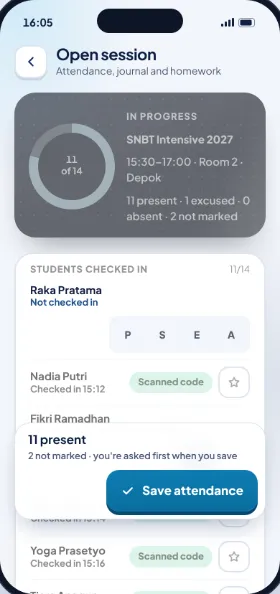
Students scan a code at the front desk or join online. Every session taught goes into the tutor pay recap.

  • Session notes for each student
  • Pay details per session every month
Centre adminat the learning centre

Every session and lead on one screen

Nisa sees who has arrived, which sessions are running, and leads from the first question to enrolment.

  • Trial classes, placement tests and package offers
  • Reschedules and make-up classes
Learning centre ownerat the learning centre

Approve tutor pay from your phone

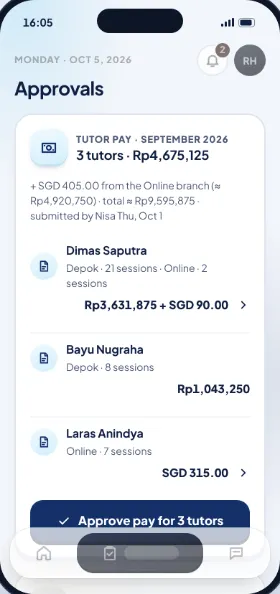
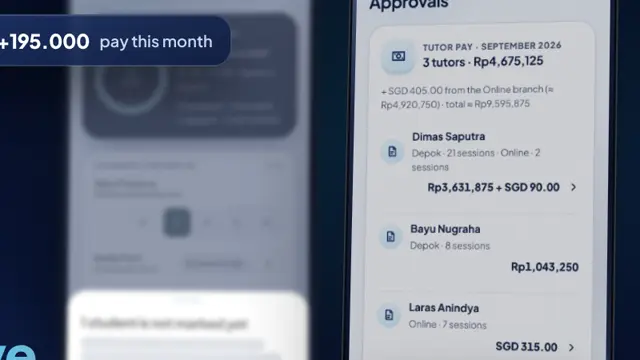
Mr Rizal sees each tutor's pay per branch, then approves it with a PIN.
  • Income per branch and per currency
  • A recap the owner prepared is approved by a second person
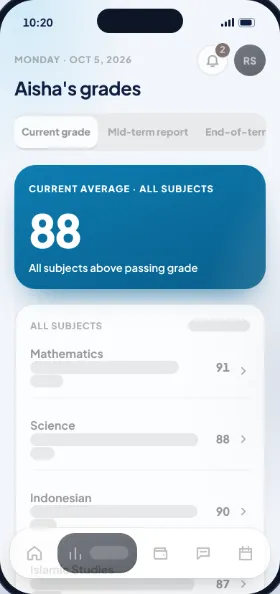
Aisha's grades per subject in the parent app
Class 7B attendance in the teacher app: 28 present, 2 absent
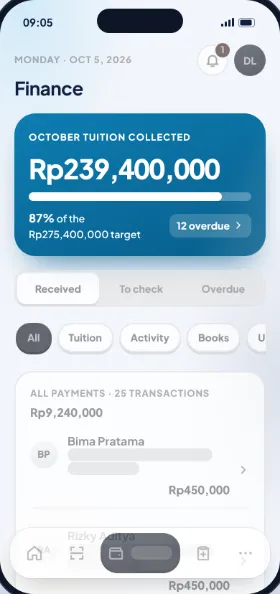
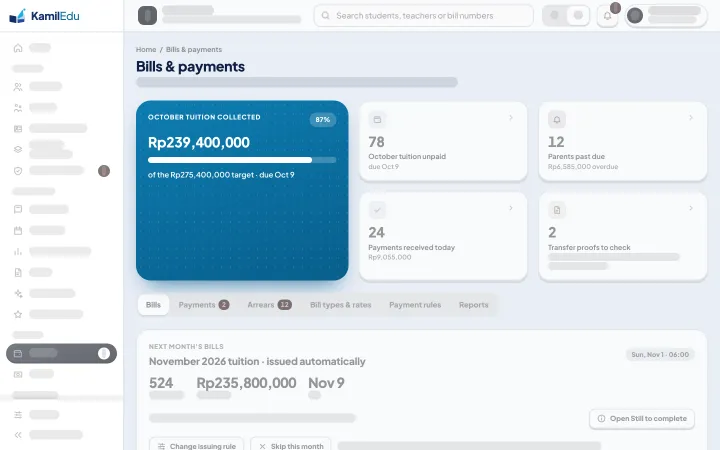
Finance in the school office app: October tuition collected so far
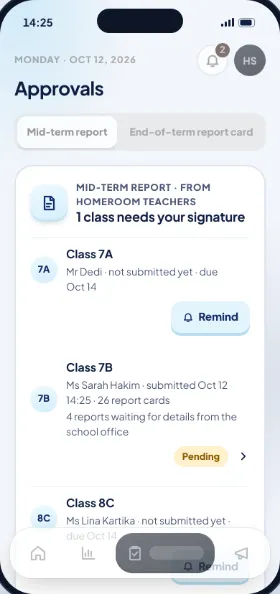
Mid-term report approvals in the principal's app
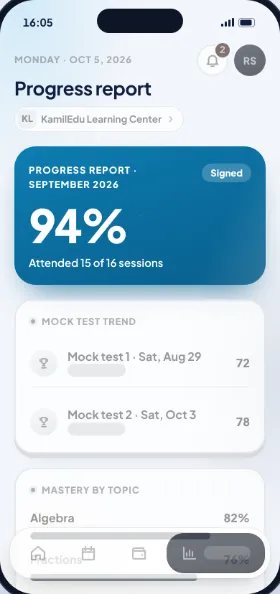
Aisha's progress report at the learning centre: 94% attendance
SNBT Intensive session in the tutor app: 11 of 14 students present
Centre admin home screen: 18 of 22 students in today
Pay approval for 3 tutors in the learning centre owner's app
For schools

All the school's work, from the gate to the report card

Pick only the features you use, and add more whenever you need them.

Grades & digital report cards

Final grades follow the school's weights. The teacher's recap, the principal's report and the report card always match.

  • Grades
  • Report cards
  • Class activities
  • Timetable

Online tuition & payroll

QRIS or virtual account is paid at once. Transfers and cash are checked by the school office, and every payment has a receipt.

  • Bills & tuition
  • Payroll

Parent communication

School announcements and direct messages between parents and teachers, without noisy group chats.

  • Announcements
  • Messages

Online admissions

Applicants register through a link and upload their documents. The school office checks each one.

  • Registration
  • Documents

School exams

Question bank, exam schedule and rooms, supervision, then the scores go straight into the recap.

  • Question bank
  • Mid-term & final exams

AI for teachers

Help writing lesson plans, materials and quizzes, plus study suggestions for each student.

  • Lesson plans
  • Materials & quizzes

Teacher awards

Teachers earn points for real work. Reaching a new level adds a bonus to the next payroll.

  • Points & levels
  • Badges
For learning centres

All the learning centre's work, from leads to tutor pay

For SNBT prep, private tutoring, language courses and online classes. One branch or many.

Packages & session credits

Monthly or per-semester packages, or session credits for private sessions. Each attended session uses one credit.

  • Packages
  • Session credits
  • Installments

Attendance per session

Students scan a code at the branch or join online. Student and tutor attendance is recorded once.

  • Code scan
  • Join online

Reschedules & make-up classes

Cancel at least 24 hours ahead and the session credit is kept. If a tutor can't come, a substitute steps in.

  • Reschedules
  • Substitute tutors

Mock tests & rankings

Scores per subject, rankings in the class and branch, and a target campus. Students and parents see the results right away.

  • Mock tests
  • Rankings

Progress reports

Attendance, how mock test scores go up and down, mastery of each topic and tutor notes, signed by the branch head.

  • Monthly reports
  • Tutor notes

Tutor pay per session

Sessions taught times the rate, plus transport or a bonus. The owner approves the recap once a month.

  • Tutor pay
  • Pay slips

Many branches

Prices, rooms and tutors per branch. An online branch can use another currency and time zone.

  • Branches
  • Currencies
Security & trust

Children's records kept safe, every rupiah recorded

Grades, money and personal details are seen only by the people who should see them, and every change can be traced.

Sign in with your fingerprint or face

Parents and students don't need to remember a password. Verification codes come by WhatsApp.

A PIN for important decisions

Approving payroll and tutor pay, signing report cards and accepting cash always ask for the PIN again.

Every change is recorded

Who changed what, and when, is always kept. Everyone can see their own sign-in history.

Nothing gets lost

Marks, attendance and payments can't just be deleted. The app explains what would happen first, and the history stays.

Follows Indonesia's Personal Data Protection Law

At the start, everyone is told which personal details are used and why. A student's account is approved by a parent.

Easy for everyone to read

Large text, strong contrast and everyday words, not technical terms.

1×entry, shown in the recap, reports, report cards and tutor pay
100%of payments come with a receipt
6digits in the PIN for important approvals
2languages: Indonesian & English
Phone and desktop

Daily work on the phone, big jobs on the computer

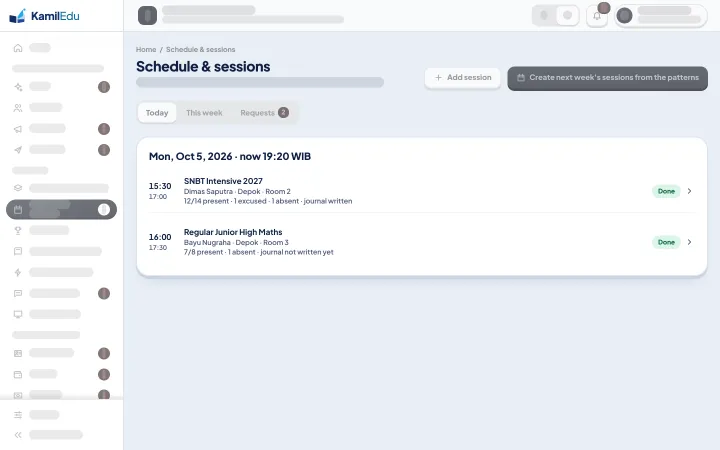
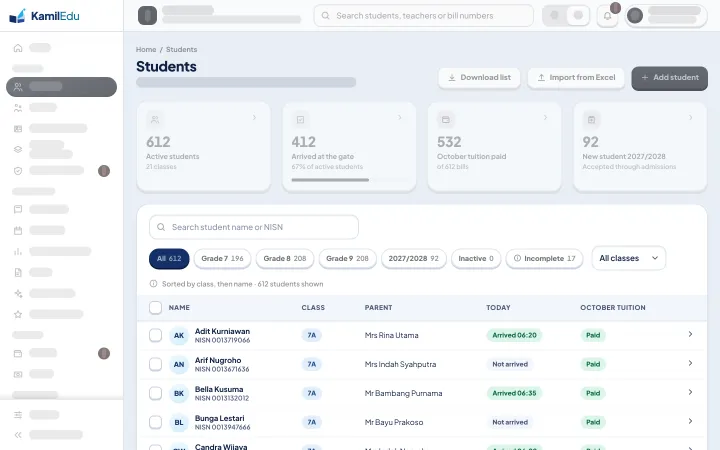
Quick everyday tasks are done in the phone app. Big jobs, like bringing in the student list at the start of the year, are done by the school office or centre admin on the computer.
In class, at the branch, at home

For the school office, centre admins and big jobs

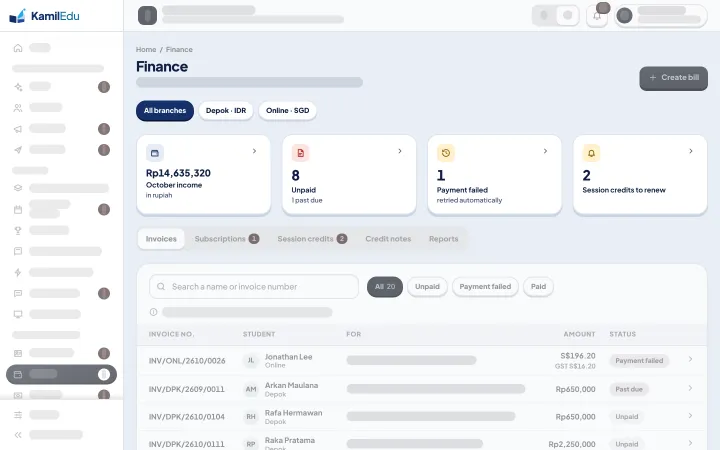
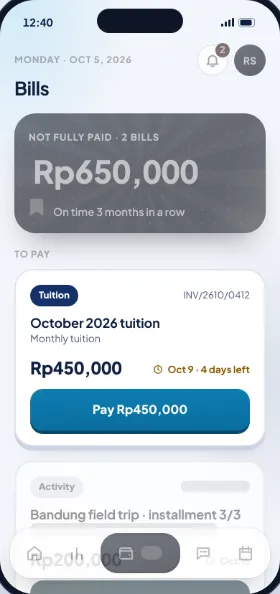
Class 7B attendance in the teacher app: 28 present, 2 absentAisha's progress report at the learning centre: 94% attendanceOctober 2026 tuition bill in the parent appPay approval for 3 tutors in the learning centre owner's appThe 612 students on the computer, brought in from ExcelToday's learning centre sessions in the desktop versionSchool finance in the desktop versionLearning centre finance per branch and currency in the desktop version
Pricing

Pay only for what you use

Schools from Rp3,500 per student a month. Learning centres from Rp399,000 a month, with 50 students included. All prices include VAT with no setup fee, and you can ask for a trial or demo first.

Your school's size

Your centre's size

Pick the closest one, or type your own numbers.

Students are counted across all branches. Enquiries and trial-class students don't count.

Sample sizes
Schools in one foundationThe more schools, the bigger the discount
The price for your schoolThe price for your learning centre
per month
The breakdown
    VAT included, no setup fee
    Open the full price calculator

    Pick a plan

    The price a month for your school, with the discount for how you pay and for your foundation. Or build your own.

    The price a month for your centre, from your active students and branches. Or build your own.

    + Rp2,500 per teacher or staff member

    5 features
    • Class attendance
    • Gate attendance
    • Teacher & staff attendance
    • Timetable
    • Parent communication

    + Rp4,000 per teacher or staff member

    Everything in Starter, plus
    • Grades & online assignments
    • Report cards
    • Class activities
    • Lesson plans & materials
    • Finance & online tuition

    + Rp6,000 per teacher or staff member

    Everything in Complete, plus
    • Online exams (CBT)
    • Online admissions
    • Payroll
    • Achievements

    50 students & 1 branch included

    Every feature except AI
    • Online tryouts (CBT) & question bank
    • Extra students Rp6,000 each
    • 1 branch only
    • Help by chat during working hours

    200 students & 3 branches included

    Every feature except AI
    • Online tryouts (CBT) & question bank
    • Extra students Rp5,000 each
    • Up to 5 branches, extra branches Rp200,000 each
    • Help by chat and online training for each new branch

    500 students & 10 branches included

    Every feature except AI
    • Online tryouts (CBT) & question bank
    • Extra students Rp4,500 each
    • Unlimited branches, extra branches Rp150,000 each
    • A dedicated adviser and one report for all branches

    Size
    Start from
    Attendance
    Learning
    Teachers
    Finance
    Registration
    Communication
    Motivation
    Always on
    Learning
    Running the centre
    Communication

    Extras

    Turn on when you need it. Change it any time.

    AI package

    Rp6,000 per teacher or staff member a month

    Rp3,500 per tutor or staff member a month

    • Study suggestions for each student
    • Materials & quizzes
    • Lesson plans
    Add any time
    • 1,000 WhatsApp messagesReminders and payment links, valid for 12 months, or Rp600 per messageRp550,000
    • 100 more AI usesWhen this month's AI quota runs outRp25,000
    • 10 more AI lesson plansWhen the AI lesson plans run outRp35,000
    • QR student cardPer card, scanned for attendance. Tap card (RFID) Rp35,000.Rp20,000
    per month
    Getting started

    Ready in three steps

    Nothing to install and no long training. The student lists you already keep in Excel are used as they are.

    Pick your kind of institution and features

    The principal, foundation or learning centre owner picks the features or package to use.

    Bring in your lists from Excel

    The school office or centre admin uploads students, teachers or tutors, classes and schedules from Excel in the desktop version.

    Everyone signs in

    Teachers, tutors, parents and students get an activation code, then sign in with their fingerprint or face.

    FAQ

    Common questions

    Short answers to the questions schools, learning centres and parents ask most.

    Still have a question?

    Ask the KamilEdu team directly on WhatsApp, or request a trial or demo for your school or learning centre.

    Do parents have to register themselves?

    Yes. Parents sign up in the app, then enter their child's NISN and date of birth, or an invitation code from the school or learning centre. If it matches, the child appears straight away. If not, the school office or centre admin checks first.

    Can one account cover a child at school and at a learning centre?

    Yes. Parents use one account, and one tap takes them from their child's school to the learning centre.

    Are students' records safe?

    Sign-in is by fingerprint or face, important approvals ask for a PIN again, every change is recorded, and all of it follows Indonesia's Personal Data Protection Law. Marks, attendance and payments can't just be deleted.

    How are session credits counted when a child can't come?

    Each attended session uses one credit. Cancel at least 24 hours ahead and the credit is kept. The owner can change that limit.

    What if the school uses a different curriculum?

    Terms and grading scales follow the school's curriculum, including Kurikulum Merdeka and IB. Using the app stays the same.

    How is tutor pay worked out?

    From the sessions actually taught times the rate, plus transport or a bonus. The owner approves the recap once a month, and tutors can see the details per session.

    How long until we can use KamilEdu?

    Once the features are picked, the school office or centre admin uploads the data from Excel. Then teachers, tutors, parents and students get an activation code and can sign in straight away.

    Can one learning centre have several branches?

    Yes. Each branch has its own schedule, tutors, prices and currency, and the owner sees a summary of every branch.

    See for yourself how your school or learning centre could work.

    Request a trial or demo for your school or learning centre. Send a WhatsApp message and the KamilEdu team will get back to you to set a time.