
Why KamilEdu exists
In many schools and learning centres, the same work is done again and again. Grades are written in a book, typed into Excel, then copied again onto the report card. Parents ask in the class group chat whether their child has arrived. Tutor pay is worked out by hand from the attendance list at the end of the month.
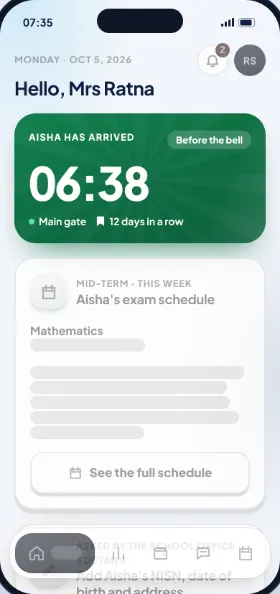
KamilEdu was made so all of that is recorded once. Teachers enter a grade once, and the summary, reports and report card match straight away. Parents are told the moment their child reaches the gate. Tutor pay comes from the sessions actually taught, ready for the owner to approve.
What we hold to
Everyday language
Every button and message is written the way a school office would say it to a parent on WhatsApp, not in technical terms.
Recorded once
Attendance, grades and payments are recorded once, then show up in summaries, reports, report cards and tutor pay.
Nothing gets lost
Grades, attendance and payments can't simply be deleted. The app explains the effect first, and the history is kept.
Children's data kept safe
Personal data is only seen by the people who should see it, and a student's account is approved by a parent, following data protection law.
Easy for everyone to read
Large text, strong contrast and simple screens, so teachers and parents don't need long training.
One account for parents
A parent with children at several schools or learning centres keeps one account and one app.
Who KamilEdu is for
Schools
Primary to senior high, public or private, one school or a whole foundation.
Madrasahs
From kindergarten to senior high, with religious subjects on the report card.
Islamic boarding schools
Attendance and Quran memorisation, boarding fees, and news for parents far away.
Tutoring centres
Packages and session credits, mock tests and tutor pay, one branch or many.
Tuition centres
Classes, term fees and parent updates with your own currency, tax and time zone.
Outside Indonesia
The app in English and Indonesian, with a currency, tax and time zone for each branch.
How we work with you
- Send a WhatsApp message. The KamilEdu team gets back to you to set a time for a trial or demo.
- Pick features or a plan. The principal, foundation or centre owner picks what to use.
- Bring in your lists from Excel. The school office or centre admin uploads students, teachers or tutors, classes and timetables on the computer.
- Everyone signs in. Teachers, tutors, parents and students get an activation code, then sign in with their fingerprint or face.
Who is behind KamilEdu
KamilEdu is made and run by the KamilEdu team. Questions, feedback or a partnership in mind? Contact us on WhatsApp +62 812-9634-9332.
How we use and protect data is explained in our Privacy policy.