
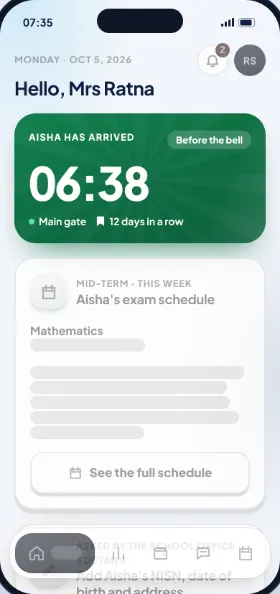
1. Start with the work you do most often
Attendance and news for parents happen every day, so their benefit shows fastest. Teachers stop writing in a book and typing it up again, and parents no longer ask "has my child arrived?" in the class chat. Start here before you move anything else.
2. Tidy up the lists you already have
Almost every school already keeps its students, teachers and classes in Excel. There is no need to type them again: the lists are brought in once on the computer, checked first, and mistakes are marked before anything is saved. Make sure parents' phone numbers are right, because activation codes are sent to them.
3. Move fees and receipts
Fees paid by QR code or virtual account are marked paid at once, without the school office matching bank statements. Transfers and cash are still checked by the office, and every payment has a receipt. Overdue fees show per class, and parents are reminded before the due date.
4. Grades and report cards
Start at the beginning of a term so every mark is recorded from day one. Teachers enter a mark once, final grades follow the school's own weighting, and the teacher's recap, the principal's report and the report card always match. At the end of the term, report cards only need checking and signing.
5. Train teachers just enough
Teachers don't need to be good with technology. Choose an app that speaks everyday language, then run a short session per group. Name one teacher per year level as the person to ask, so small questions are answered at school.
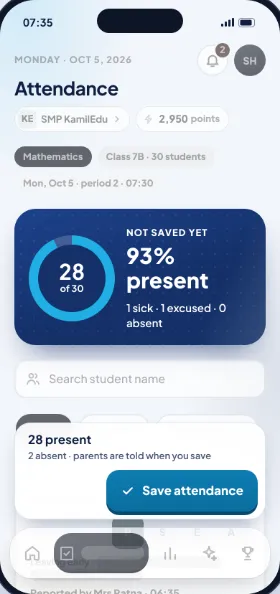
6. Bring parents on board
Parents get an activation code, then sign in with their fingerprint or face, with no password to remember. Send the first announcement through the app, such as the report card day, so parents get used to opening it for school news.
7. Protect personal data
A child's records are personal data. Make sure only the right people can see marks and money, important decisions ask for a PIN, every change is recorded, and parents give their consent at the start, as data protection laws such as Indonesia's Personal Data Protection Law require.
What does going digital cost?
In KamilEdu the cost follows the number of students and staff: the price per student times the number of students, plus the price per teacher or staff member times the number of staff. The Starter plan is from Rp3,500 per student a month (Indonesian rupiah), including VAT and with no setup fee. There are no servers to buy and nothing to install at school. Work out the cost for your school.
A short checklist
- Pick one daily task to start with (attendance and news for parents).
- Prepare the lists of students, teachers, classes and parents' phone numbers in Excel.
- Decide who does what: the school office for lists and fees, homeroom teachers for attendance.
- Run a short training session and name a person to ask for each year level.
- Send the first announcement to parents through the app.
- Add fees next, then grades and report cards at the start of the next term.
Questions about going digital
What does it mean for a school to go digital?
Moving the school's work from paper and Excel into an app: attendance, grades, report cards, fees and communication with parents. The work is then done once and everyone sees the same numbers.
How long until a school can use the app?
Once the features are picked, the school office uploads the lists from Excel. Then teachers, parents and students get an activation code and can sign in straight away.
Does the school need to buy a server or new computers?
No. KamilEdu runs on the phones teachers and parents already have, and the desktop version opens in a browser.
Do teachers need to be good with technology?
No. The screens use everyday language, attendance for a whole class takes seconds, and a short training session is enough.